Free Games
Games PC|Psp|PS .

Free Download
Software|Driver.

CHATONlYNE
Chat With YOur friends .

SECURITY
Protection programs and tutorials - will not be hacked anymore -
Showing posts with label facebook. Show all posts
Showing posts with label facebook. Show all posts
Monday, 13 June 2016


Saturday, 26 April 2014
symbols facebook chat
Symbols For Facebook (New)

To use these amazing symbols, all you have to do is copy the code below the icon and paste it right into Facebook status or comments, simple!

Facebook Symbols and Chat Emoticons
Facebook Icons Chat symbols
¸.•´¸.•*´¨)
(¸.•´ (¸.•` ¤ Thank you!¸.•*¨)

¸¸.•*¨*•♫♪¸¸.•*¨*•♫♪¸¸.•*¨*•♫♪¸¸.•*¨*•♫♪¸¸.•*¨*•♫♪¸¸.•*¨*•♫♪¸¸.•*¨*•♫♪
Sunday, 30 March 2014
Facebook develops its project to connect the world to the internet

At Internet.org, we're committed to developing ways to make affordable internet access available to everyone on the planet.
Lasers can offer a wireless connection to the Connectivity Lab's satellite system, delivering high speeds on par with “fiber optics,” Maguire said. A Facebook spokesperson said the company had "no specifics to share" on a timeline for when the Connectivity Lab plans to begin testing.
"Our goal with Internet.org is to make affordable access to basic Internet services available to every person in the world," Zuckerberg said in his post announcing Connectivity Lab. So what does Facebook make of Google's Project Loon?
"The Connectivity Labs were established to support the initiative of Internet.org," a spokersperson said. "The more companies, the more organizations working towards the goal of connecting people around the world, the better."
Monday, 11 November 2013
how to get unlimited AddMeFast Points Automatic Actions
How To Get automatic point on addmefast
Their is no software/bots to getting points let me know you that all software and bots are fakes it steals your data, and can hijack you easily. I will just giving you a .js file and just open it in imarco and start your getting points
Step 1: Download Mozilla if you haven't it. install it
Step 3 : Download This File click Here
step 4 : Now extract on
Documents\iMacros\MacrosDocuments\iMacros\Macros
Step 5: Now Open Mozilla > Click on iMacros Icon on top of your browser


Automatic Actions will be start it will be page liking
XD
Friday, 21 June 2013
Stickers for Facebook Messages
For Chat Facebook

OK Detroit, Facebook for iOS is on a roll with the new messaging features and look within the app. They
are rolling out new features and redesigns like a big three assembly line! Another update is out (version 6.0.1) that brings Facebook messaging stickers! These stickers are admittedly adorable, and sure to be fun for everyone to play with. There are additional packs that can be downloaded for free from within the inbox and its not that far of a reach to predict that at some point there may be some paid packs


ADD
In Or In


Thursday, 23 May 2013
increase Likes & fllowers In Facebook YouTube Google +1 Twitter & web site Is Free
Free Likes and Flowers and subscribe

Site Addmefast is the most beautiful and the most basic sites in the process of exchange of visits and Likes Wu This site is based on the collection points and then converted to what you want visitors or fans and Wu You can collect points through the use of the methods available to you on the picture
CliCk Here For Go To Link (Direct)

For Get Automatic Licking Click Here
Friday, 10 May 2013
How To Find Fake Profile In Facebook
How To Find Fake Profile In Facebook

Besides being a social network facebook is a serious threat for your personal information.More than 1000 fake profiles are being created each day and it is hard to find them too.It is very important to check a profile before you add them into your friends list.There are few things you may need to check in a profile to identify whether the profile is fake or not.
The Profile Picture :
- You have 50% of chances in finding whether a profile is fake or not by just checking their profile picture.
- A fake profile's picture will mostly be a photo of a sexy or a hot girl.
- Check whether they have more than one picture of them as fake users will mostly have only one Picture in their profile.
- Fake users will not upload a picture posing with their friends.
- If you doubt you have already seen the image somewhere else then check if the picture is in someother profile by just just Dragging their profile picture into the search bar of google and google finds you the exact match of the image with their details.
 |
| Image search Looks like this |
The Profile Information :
- Firstly fake users wont have any information on their profile , it would be empty.
- Check the date of birth as it will be mostly like "1/1/91" as fake users are lazy to think and type them.
- Fake users will have irrelevant schools and location.
- Most of the girls(good girls) on facebook won't have their phone number visible in their profile information and if you see the number on their profile then there is a chance of it to be a fake profile.
- Check their likes and community.
- Fake users won't have proper mail id.
- Fake users won't have time to play games on facebook so they wont have any game applications on their profile.
The Friends List:
- Fake profiles will have more friends in their opposite gender and those friends will have no relation between the other friends in their profile.
- Check the date the profile was created and jf the profile has to many friends in a short span then it is more likely to be a fake profile.
Note The Activity :
- Fake users will accept bulk requests on a single day.
- Check the news feed of the profile as fake profile users won't post or update anything instead they keep on adding friends to their list.
- If the profile has many links shared whit catchy words those may lead you to a phishing page,so be aware of clicking on any suspicious links.
Conclusion :
If you get a request from an unknown profile then think twice before adding them to your profile.So unless you are sure about a person do not add them.
List of Facebook tricks collections
List of Facebook tricks collections
Techfishy has already posted many tricks on facebook and this post is a collection of all the tricks we have seen so far.As we are in the ending of this year a quick recap would make you remember all the facebook tricks.

Deactivating the facebook account is different from deleting the account.Once your account is deleted it cannot be re-activated again.To delete the facebook account permanently click on the below link and follow the simple procedure.
2.How to Increase Facebook Fan Page Likes :
Facebook is adding several new features for the page owners which can make you more popular on facebook and also can bring more traffic to your website.To know how to increase the facebook fanpage likes in a short period of time read here :
3.How to Delete Anyone's Profile From Facebook :
Do not use this trick to avenge your friends and i am not responsible for your actions.
Facebook will delete an account which is reported as spam by more than 25 users.
All you need is a facebook page.If you don't have one create a page and we are going to create an event in that page with the following details.
Event name : Stop facebook fake users
Details :(copy the link of the fake user)
Step 1: Go to the above link and report block.
Where:(Choose a relevant place)
When:(Select a starting and ending)

Now its time to invite your friends for this event.Invite from 20-30 people and your job is done.You could also offer them some price for this event.
4.How To Find Fake Facebook Profile :
The most difficult thing on facebook is accepting a friend request having a doubt whether it might be a fake one.It is easy to find a fake profile and to know more about it read here :
5.Three Chat Smiley You Might Not Be Aware Of :
Type these symbols on your chat box to see the like,dislike and mid finger symbols.
- [[midfing]]
- (y)
- [[disliker]]

6.Forward Chat Messages Without ctrl+c and ctrl+v :
Facebook provides an option to forward the messages.in a single click.Select the messages to be forwarded and send it to any of your friends.

7.Download Facebook Videos :
Downloading a video from youtube,metacafe and other sites are easy but in facebook it is not that easy.So to make it easier go to this website and paste the link of the video and click download.
How to increase facebook fan page likes
How to increase facebook fan page likes
The below method i am going to share with you will not only tell how to increase yourfacebook Fanpage likes But also Increase your Twitter , GooglePlus , StumbleUpon , YouTube and MySpace Followers.Remember the below procedure is legal to increase the facebook fan page likes and so i would recommend this method .You cannot increase your facebook fan page likes over a night Using this method But i assure you would get around 200 likes a day if you spend few minutes per day.
I have given two methods That can double your likes and shares.Follow both the method .
METHOD 1 :(update : facebook likes and shares are disabled now in youlikehits try the next method.)
Follow the simple procedures to increase your facebook fan page likes :
- Go to this Website
- Sign up an account there and login.
- Once you login , you can see something like this :
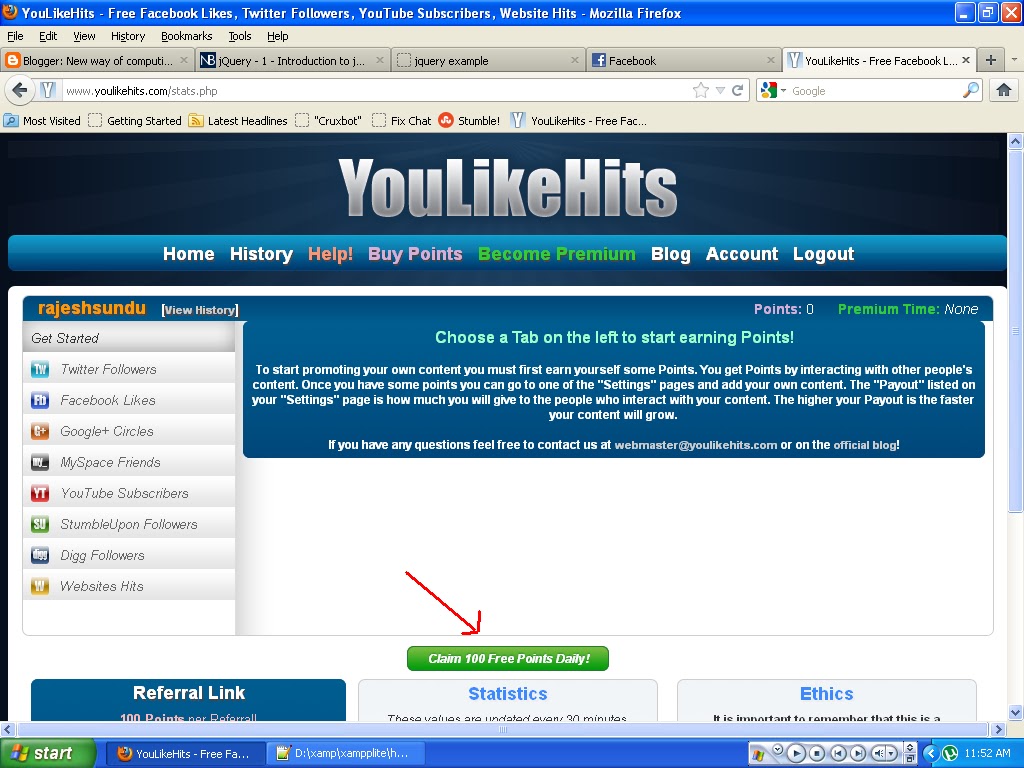
4. Now go to your homepage and click get 50 points like shown above
You can get this 50 points for every24 hour.
NOTE: The first time you login you need to wait for a day to get this points.
Update:Now they provide points only if you like 5 facebook pages of other people !
5. Then go to Facebook settings like shown below :
6. Login with your facebook profile first , then add your facebook fan page Link.
7. In YoulikeHits go to your facebook account settings and set up the points you would like to give when someone likes you page as shown below :

8.The more the points you give away , the more preferences will be given to your page.I would recommend to set 4 points which can get a reasonable number of likes per day.
9.You can also earn points by liking other people pages in facebook in YouLikeHits.
The Above procedure mentioned is same for all other websites like Twitter , GooglePlus , StumbleUpon , YouTube and MySpace .
Use the below method also and get your likes and shares doubled.
METHOD 2 :How to increase facebook fan page likes :
- Go to this website
- Sign up an account there and login.
- Once you login , you can see something like this :


You can get this 100 points for every24 hour.
NOTE: The first time you login you need to wait for a day to get this points.
5.You can add your facebook or anyother page by clicking the link mentioned above in the picture.
6.Set points to your page like this :

7.The more the points you give away , the more preferences will be given to your page.I would recommend to set 8 points which can get a reasonable number of likes per day.
8.You can also earn points by liking other people pages in facebook in ADDMEFAST.
The Above procedure mentioned is same for all other websites like Twitter , GooglePlus , StumbleUpon , YouTube and MySpace .
Thursday, 9 May 2013
Facebook chat format to any other format of your choice
How To Change Theme Facebook

Funnerapps site is the site for you oeuvre only the possibility of changing the form of Facebook, but also gives you a marked change in the form of depleted chat to the any other form of your choice. Only after a site, scroll down a bit to look for the inter Facebook Chat Platinum then click on the GET it, then will go to the Chrome web store page where you must download application that Satbut the browser Google Chrome only! (Sorry Firefox users).
After downloading and Taatbeth the addendum went to the track Menu> tools> Extensions also is in the picture

Now Search for the Facebook Chat Platinum application and click on the settings you will find the possibility of choosing a number of designs chat, you can choose including Mirouk of you before you click on memorization, where after orientation on your Facebook you'll find that depleted chat changed to the design you have chosen. Congratulations to you
Funnerapps site oeuvre you just might change depleted chat, but the also the possibility of changing the form
of Facebook to any other design, just across the load the application and set it up as you added with the previous addition to the change in the form of YouTube and the many wonderful applications. Enjoy
Click Here
Thursday, 25 April 2013
WANT TO KNOW WHO VISITS YOU ON FACEBOOK
WANT TO KNOW WHO VISITS YOU ON FACEBOOK

iFamebook is the 1st application in the world that allows you to know who visits your Facebook profile! And it's completely FREE!
HOW TO INSTALL IFAMEBOOK?
- First, you need the Firefox browser: http://www.mozilla.org/
- Visit this very page with Firefox, and click on the green button "Add to Firefox" to install iFamebook
- Enjoy! ;-)
VERY IMPORTANT
You will see your friends visits only if they have iFamebook too. Be sure don't miss any visit, by sharing it now with your friends!! :-)
______________________________________________________
iFamebook participates in the "Research on Privacy in Internet Advertising" of the Max Planck Institute for Software Systems (MPI-SWS).
______________________________________________________
How it works?
It is very simple: your visits and those of your friends are saved in a database, and every moment you can know who visits you.
Someone told me that I can't see who is visiting me on Facebook, is it true?
It's true only in part: it's true that Facebook applications and Facebook pages can't let you see who visits you, so don't trust them! This is a technical limit, as well as contractual limit, imposed to developers by Facebook.
For this reason, iFamebook does not rely in any way to Facebook. We chose the more difficult road, and that's why our application is UNIQUE in the world :-)
Can I see the visits of not friends?
YES, you can see all the visits, even if your visitors are not a friend of yours on Facebook.
How can I see who is visiting me?
To see who's visiting you, click on the "iFamebook" LOGO at the top of any Facebook page.
______________________________________________________
Is iFamebook FREE?
YES, iFamebook is completely free. Do not trust everyone who asks you to fill out forms or sending money to install iFamebook, these are scams!
IMPORTANT: iFamebook contains advertising?
YES, by installing iFamebook you authorize the display of banner ads, contextualized according to the page you are visiting. The positions of the banner are the following:
Facebook: a vertical banner, to the right
Google: a small banner, at the top
YouTube: a square banner, to the right
Bing: a small banner, at the top
Yahoo: a small banner, at the top
Twitter: a small banner, to the left
Download Here
Subscribe to:
Posts (Atom)


.jpg)